Archives → January 1970
← December 1969 | Archives Index | February 1970 →
A look at the new Mathematics 7-10 syllabus for NSW
This post is a single point to access some of the resources I'm developing as I investigate the new Mathematics K-10 Syllabus (2022) released by the NSW Education Standards Authority.
Dates as Operations 2018
In 2017 I published a post Dates as operations 2017 - a collaborative effort to write a mathematical statement from the digits of the date.
Here is the 2018 version. To quickly access in class type gomaths.net/dates into your address bar.
Updated for 2019: gomaths.net/dates
Updated for 2021: gomaths.net/dates
Updated for 2022: gomaths.net/dates
Updated for 2023: gomaths.net/dates
A look at the new Mathematics Standard syllabus for NSW
Updated: 23/06/2017
 DoE Numeracy Conference: the presentation is item 5a below. The continuum handout is item 6. NOTE, I have added an amendment after the presentation upon reading the NESA Course Descriptions released 21/6/17. The continuum handout is correct as per the Syllabus but incorrect as per the Course Descriptions.
This post is a single point to access some of the resources I'm developing as I investigate the new Mathematics Standard Stage 6 Syllabus (2017) released by the NSW Education Standards Authority.
Dates as Operations 2017
Like most teachers I write the date at the top of the whiteboard each day. As an extra point of interest, in 2016 I endeavoured to write a number sentence using the digits of the date, in order, underneath the date.
Data values vs scores
Note for self really,
In the new NSW Syllabus for Mathematics K-10 what used to be referred to as scores when analysing data are now called data values.
So the definition of mean is written as
$$\bar{x}=\frac{\text{sum of data values}}{\text{number of data values}}$$
Dice - MathsStarters
I've updated the electronic dice on MathsStarters. Includes ready to go Multo and Addo cards.
Variations of dice include two six-sided dice, two ten-sided dice or two custom dice (0 to 20) - the dice can show multiplication or addition and answers.

Bingo: Fractions, decimals and percentages
I've added an additional game under the Fractions category on MathsStarters Bingo:

Animated perimeter and area
For a recent session with teachers about whole school numeracy, I created a couple of animations demonstrating:
Excel for Mathematics General
The Mathematics General (Stage 6, Years 11 and 12) syllabus in NSW includes numerous content points, considerations and suggest applications involving spreadsheets. But, I suspect, many teachers are not using spreadsheets in their lessons mainly because you get through the course without using them. Yet using a spreadsheet to complete some of the mathematical heavy lifting, can allow for the use of real-life data and the investigation of scenarios.
Odometer, the Universe and trains
Today in class, Year 7, I linked to decimals:
- the odometer in my car... rounding 19.999 to 2 decimals places is like 19999 on the odometer kicking over to 20000
- π...
and the universe - trains terminating at the end of the line
- Luna Park, because trains terminate behind Luna Park
- and of course, Arnie, the Terminator.
Pythagorean Dates
 Monday (17/08/15) was a Pythagorean Day (172 = 82 + 152).
Spirolaterals - Year 5 Lesson
For the second lesson with Year 5 students (the first is here), we created and investigated Spirolaterals.
Number of the Day (junior)
Just added to MathsStarters: Number of the Day (junior) is for Stage 2/3 students (Years 3 to 6) covering:
-
represent numbers of up to four digits using objects, words, numerals and digital displays
-
identify the number before and after a given two-, three- or four-digit number
-
count forwards and backwards by tens and hundreds on and off the decade
-
arrange numbers of up to four digits in ascending and descending order
-
use place value to partition numbers of up to four digits
-
round numbers to the nearest ten, hundred or thousand
[MA2-4NA; ACMNA052, ACMNA053. Reference: NSW Syllabus for the Australian Curriculum, Mathematics K-10 Syllabus]
Magic Vs - Year 5 Lesson
 Today I had the fun of 20 Year 5 students in my classroom. I used the Magic Vs problem from NRICH. NRICH have lots of good leading questions, solution discussions and videos. There was lots of great thinking and discussion.
I made a SMART Notebook file to aid the discussions, available on MathsFaculty.
Lists on MathsLinks
On MathsLinks there is a new feature to create Lists. Lists are, like they sound, similar to a wishlist or shopping cart - you can create a list of links chosen from MathsLinks.
MathsLinks Feature: Share to Google Classroom
Many teachers are now using Google Classroom to connect with their students. Recently Google added the ability for external sites to share to your classroom. I have added this functionality to MathsLinks.
Bingo: Trig Exact Values (Radians)
I've had Make bingo for trig exact with radians on my To Do list for a while.
Percentages Foldable
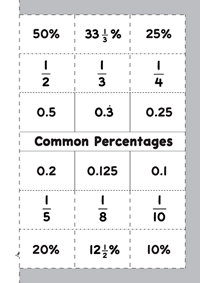 I recently made a Percentages Foldable (common percentages and their fraction and decimal equivalences) to include in our school newsletter. The idea was to encourage students (or parents) to make the foldable and put it on the fridge, or somewhere else prominent, to encourage the remembering of some common percentage comversions.
Stamping Feedback
I found the previous stamps I had made so helpful that I got a few more made.
Relative Frequency - Investigation
Probability is one of those topics where it's best to "see it".
Growth Mindset. Yes, but…
As I've thought about "Growth Mindset", see also Jo Boaler, I am convinced but then I head into class and walk out unconvinced. That disconnection is helpfully elaborated on in this blog post:
The Math Ceiling: Where’s your cognitive breaking point?
Math with Bad Drawings
Worksheets are not bad… here’s proof
Don Steward shares his excellent worksheets on his blog, Median.
Woo2be: Videos for Teachers
Eddie Woo (YouTube: misterwootube), creator of over 1500 videos for students of Mathematics (with 7000+ subscribers and over 700 000 views!) has launched a second channel for teachers of Mathematics. Looks like he will be featuring videos from conferences, teaching and learning ideas, useful resources, book reviews and more.
Great idea! Looking forward to watching.
The transience of sharing
As a serial organiser, a brain cell explodes when I read on a social network involving teachers, "where can I find?" or "has anyone got?".
Rounding Using Significant Figures - MathsFaculty
A resource I put together for practising rounding using significant figures.
Coordimate on KickStarter
The Coordimate looks like a great idea, currently 80% funded:
Mathematical Symbols in PowerPoint for Mac
This screencast follows on from the previous Mathematical Symbols in Word for Mac.
In this screencast, I show a fast method for typing mathematical expressions involving basic symbols (like × and ÷). This method doesn't require the mouse to navigate a menu nor does it require an Equation to be inserted.
Mathematical Symbols in Word for Mac
This is an update to the second most popular item on this blog, Maths symbols in Word (Mac).
Stand-alone YouTube
Increasingly I am consuming media on my desktop computer rather than my TV when at home.
Numberphile, for example, publishes one or two videos a week that I want to watch. However, I've always found watching in the browser annoying. Two ways to improve the YouTube viewing experience are:
- install an extension like ImprovedTube (for Chrome) which, as the name suggests, improves the experience of watching on YouTube - stops AutoPlay for example.
- download YouTube videos to watch in a media player. There are online services and software that can do this. But you then have to wait for the download (rather than streaming) and I don't necessarily want a copy of the video once watched.
Looking to 2015
I usually write a start of year post. Here are a few quick specifics.
Adam Spencer’s Big Book of Numbers
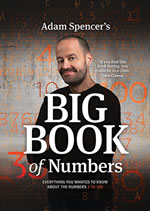 This holidays I wandered through Adam Spencer's Big Book of Numbers (currently sold out). For teachers, if you purchase from Adam's site, I paid a little extra to also get a Lesson Plans booklet.
New year reading
How to Avoid Thinking in Math Class is developing into a nice series to take us back into the new school year.
“When am I ever going to use this?” Fractal edition
Self-checking Christmas Worksheet
Here's a self-checking, simple questions, as you get the answers correct the tree lights up.
Nothing fancy. Just needed something for a computer lab tomorrow.
Sierpinski Triangle
Continuing with some design and construction activities for the end of term.
Pizza, it must be engaging, right?
Recently, I have been considering how to see more fruit in my classroom. As I mentioned previously, the effort factor is significant. The modern idea that students will (or should?) only engage in activities of interest to them goes against everything they will come up against in the future.
Constructing Triangles
One of the challenges I had this week when students were constructing rectangles and squares using a ruler and set square (drafting triangle) was checking the accuracy of the measurements (sides and angles). I walked around with a ruler and set square checking their drawings.
Square Design
I found this design on a photocopied worksheet from an old textbook, but I don't know which, so cannot credit.
(If you know the source, please let me know)
Scale Cars
Matchbox cars, specifically that brand, have a scale written underneath.
I've always wanted to do something with that.
The struggle we face in education
There are students in my classes for whom no matter what you do, they will not engage. They lack motivation. The motivations I would have had at school: please my parents, work hard out of a sense of duty, do my best to move forward to the next thing, do not exist even a smidge for some students.
End of Term 9 - world’s best paper airplane
I think I just found the activity for the last period on the last day of the year.
Video of myself in lessons
Looking at the area of special quadrilaterals, I wanted the class to make the quadrilaterals starting with paper rectangles.
This particularly class, however, struggle with step-by-step instructions. A document camera would be great, but I don't have one.
So I made a set of videos, these had the benefit of being large, on the big screen and something a little different.
I need to do this better #1 of ∞: find missing side
Students struggle with this:
Problem Solving, Spider and the Fly
How would use this in your classroom (the problem, not the video)?
The Developing Teacher
In the past, Maths teaching resources amounted to printed materials (be it a textbook, BLM). If the teacher didn't like what was available to them, they could hand-draw and Gestetner a more appropriate worksheet.
The weakness of education research
This is my new go to post when I see a new idea in education labelled as research-based, This Is Interesting & Depressing: Only .13% Of Education Research Experiments Are Replicated. That blog post also links through to the press release and full paper as well as this summary video:
Preparing to Engage, Enhance and Extend
I am presenting twice in September about how I use technology to engage, enhance and extend in my teaching.
Sign in to MathsLinks with Edmodo
You can now sign in to MathsLinks with an Edmodo account.
This saves you from remembering another username and password.
MathsLinks also allows you to sign in with a Facebook, Twitter, Google or LinkedIn account.
[If you already have an account on MathsLinks, go to your profile page and you can add the ability to sign in with Edmodo.]
Maths Teaching Crisis
Everyday in the media, maths teaching and teachers are being judged. Maths teaching is in crisis. A shortage of maths teachers (and science) and the, presumably poor, quality of maths teaching.
Simple Harmonic Motion with Sam
Back in 2012 when I first taught Extension 1 Mathematics, in particular Applications of Calculus to the Physical World - Simple Harmonic Motion (SHM), I captured this clip of my then 2 year old son:
Water usage and collection
For my HSC Mathematics General 1 class, we are currently completing the Focus Study FSPe1CEC Water usage and collection.
In this topic, students interpret information, make comparisons, and perform a range of calculations in relation to personal water usage.
Solving Equations Booklet
These are resources I developed for a Year 9 5.1* class.
(What is not shown in these resources is not all of the conceptual steps I took with this class.)
MathsLinks This Week 11 May 2014
I want to start writing more regularly to highlight some of the resources on MathsLinks and MathsFaculty, and putting them in the context of my teaching.
Activity - Atlantis and Hubble in front of the Sun
If we can determine the altitude of a plane in front of the moon, why not try the altitude of the Space Shuttle Atlantis in front of the Sun?
Activity- Airplane in front of the moon
Back in 2011, Nordin Zuber posted this found image on MathsLinks.
A resolution
I have made a resolution to write more regularly on this blog. Pretty sure everyone with a blog has said that at least once, I've probably said it... oh... wait.
Number of the day
Here's a starter activity I have built on MathsStarters: Number of the day.
MathsClass This Week 21 December 2013
Happy end of school year (in Australia at least).
MathsClass This Week 21 September 2013
The September/October holidays edition...
Last week was the annual MANSW conference, and I posted a couple of summaries.
MANSW 2013 Extras
Some extra bits from the MANSW Annual Conference.
MANSW 2013 Day 1
A summary of the sessions I attended at the 2013 MANSW Annual Conference. This summary is the key points I wanted to remember.
MathsClass This Week 8 September 2013
The annual Mathematical Association of NSW (MANSW) conference is this week. I hope to meet some of you there. I will have lots of MathsLinks business cards for you to take back to your colleagues.
Collecting data from a class
Today, Year 8 did the Smartie Statistics activity. One of the problems in the past was collecting all the data from the students.
Classifying Data - Foldable
Here’s a second foldable for the Preliminary (Year 11) General Mathematics course for the topic DS1 Statistics and society, data collection and sampling.
This second foldable is about classifying data.
Statistical Inquiry Foldable
I’m trying to make the time to create foldables to use with my Year 11 General Mathematics class. The topic DS1 Statistics and society, data collection and sampling lends itself to foldables.
The first foldable is for the process of statistical inquiry:
posing questions, collecting data, organising data, summarising and displaying data, analysing data and drawing conclusions, and writing a report
MathsClass This Week 3 August 2013
TeachMeet AC Maths on Thursday gone was fantastic. Check out the wiki page for the presentations.
Here’s my 2 minute presentation about MathsLinks.
Lots of links added to MathsLinks and and files added to MathsFaculty.
MathsClass This Week 28 July 2013
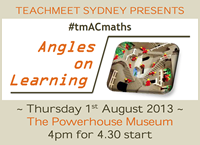 For teachers in Sydney, I hope to see you at the TeachMeet for the Australian Curriculum in Maths – this week, Thursday 1st August 2013.
MathsClass This Week 14 July 2013
A new help page on MathsLinks has 6 videos to help you, your staff or colleagues get acquainted with using MathsLinks. The videos total just under 6 minutes and cover signing up, using a link page, sharing from MathsLinks, browsing, submitting a link and getting updates. Ideal for a faculty meeting or staff development day activity.
MathsClass This Week 6 July 2013
A reminder about the new feature added this week. You can now leave a comment on any link or resources shared on MathsLinks and MathsFaculty.
The comment might be a teaching idea or a review of the resource.
Sharing those ideas
In January, I wrote “let’s make 2013 the Year of Sharing”. We probably all know that some of the best sharing is not a specific link or a tangible resource, but an idea. Those discussions may happen in the staffroom, over a coffee, on playground duty or on a social network.
MathsClass This Week 29 June 2013
Sydney, Australia, based teachers put Thursday 1st August 2013 in your diary for the TeachMeet Australian Curriculum Maths.
NSW Syllabus for the Australian Curriculum - Content Breakdown
Teachers in NSW, are currently programming for the New NSW K–10 syllabuses for the Australian curriculum which will be implemented from 2014.
MathsClass This Week 8 June 2013
This week, MathsLinks hit 700 links all categorised by topics and syllabus.
MathsClass This Week 1 June 2013
 Lots of additions to the Downloadable Essentials section on MathsKit this week. Including: A page of table of values and coordinate grids, pages of number lines, some more pie charts and trigonometric graphs, blank, degrees and radians.
MathsClass This Week 20 May 2013
Downloadable Essentials is a new section on MathsKit.
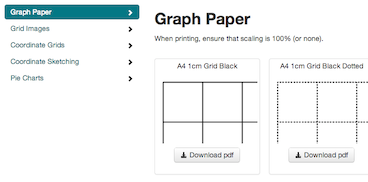 In meeting the purpose of MathsKit, quick links to resources for Maths teachers, there are free downloads of graph paper and lots of grid images. There are lots of sites offering free graph/grid paper, but not so many providing high quality grid images with the specific purpose of using them in a worksheet or exam create in Word (or other program). Please suggest other files that should be available, I will gradually make and add.
MathsClass This Week 4 May 2013
‘Tis the season to be programming.
Teachers in NSW are currently programming for the New NSW K–10 syllabuses for the Australian curriculum in Mathematics. (Of course, teachers in other states have already implemented the Australian Curriculum) As all these teachers are programming and collecting resources, I’ve updated MathsLinks and MathsFaculty with the outcomes from this new syllabus.
Would numeracy levels improve…?
Just thinking during the staff development day.
Would numeracy levels improve if other faculties devoted same amount of time to numerical problem solving as they do to persuasive writing?
— Simon Job (@simonjob) April 29, 2013
Current State 2
After writing Current State, I read these three articles that all resonated.
Current State
There have not been many thoughts on the art of teaching on this blog for a while. Most of my posts have been about an activity/resource that I’m sharing, and it will continue to be that way.
Number Sense Posters
For a few years, I’ve noticed that kids not only don’t know/struggle with their times tables, but also general ‘number sense’.
Animated Budgie
Mathematical Induction, topic 7.4 in the NSW Board of Studies Mathematics Extension 1 Syllabus, is difficult conceptual. I suspect students think there is a bit of smoke and mirrors happening. One introduction that I use, I first saw in a resource by Stuart Palmer. The same story appears in this article online: Mathematical Induction (PDF 92KB), Helen Bush, Reflections August 1992 sourced on NSW HSC Online.
MathsClass This Week 9 March 2013
For users of Pinterest, you can now share links on MathsLinks to Pinterest. Click the Share dropdown.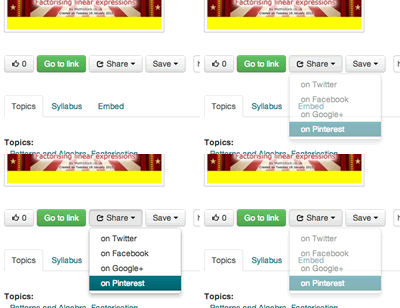
Try it on this link, you get a nice screenshot of the site in Pinterest.
Random
The “automatic simple random number generator” on MathsStarters got a little fix-up today.
MathsClass This Week 2 March 2013
Try out the Word Search on MathsStarters. There are only three versions at the moment (although the placement of the letters is different each time you play the game). If you’d like to add a game, just send me a comma-separated list of words and a title for you game. For teachers in NSW, Australia, my current aim is to make a word search for each topic in the NSW General Mathematics syllabus.
Also, I’ve added the search functionality back on this blog.
MathsClass This Week 23 February 2013
Today, MathsStarters Quick Quiz got an update with several additional quizzes. Bingo got a new game, ‘Writing Rates’.
MathsClass This Week 9 February 2013
The provider for screenshots on MathsLinks has been updating meaning that all sites now have a nice, slightly larger preview image. For YouTube videos, I’m getting a screenshot straight from the video.
Any link on MathsLinks can be “liked”. If you find a link useful, like it… just click the thumbs up. This lets teachers quickly judge if others have found a link useful.
As always, your feedback is welcome.
Oh, and MathsSearch is back and working properly. MathsSearch uses a custom Google search to search over 150 maths related sites.
Series Foldable
For “Arts and Crafts Thursday”* we made a foldable to summarise the formula in the topic Series and Applications (Topic 7 in the NSW BOS Mathematics Syllabus).
Kitchen Scale
I put up my first image on Dan Meyer’s 101 Questions yesterday, Kitchen Scale. Wander over there.
What’s the first question that comes to your mind?
Maths textbooks for sale
A short self-promotion, I am selling a number of NSW Maths Textbooks on eBay.
MathsClass This Week 27 January 2013
Here, the new school year begins on Tuesday. Can you make 2013 a year of sharing?
Organising Lessons
Back in 2011 I wrote:
Some things I do… Keep a list of my lessons in Excel. Each lesson has a Topic, Title and Description – and I get Excel to make a “code” to identify that lesson.
To a new teacher…
Here is how I get Excel to create a lesson code.
It’s time to share
Now that we have a National Curriculum in Australia, let’s make 2013 the Year of Sharing.
MathsClass This Week 13 January 2013
The first for 2013.
For the new year, the sites have a new look and functionality, feedback is welcomed.
MathsClass This Week 30 December 2012
If you haven’t visited the site recently, there is a new look across MathsLinks, MathsFaculty, MathsKit and MathsClass.
The redesign is still a work in progress, and the main aim is to make it easier to use MathsLinks and MathsFaculty.
It does the Math™
Back in 2010, putting a piece of wall in our kitchen to attach a child gate to, a problem arose about evenly spacing screws.
MathsClass This Week 23 December 2012
Some seasonal links this week, enjoy the break. Merry Christmas.
Keep an eye out for new look sites soon.
Consumer Arithmetic - Spending - Electronic Worksheets
This is part 2 of my electronic worksheets for Consumer Arithmetic. Part 2 focuses on Spending Money, in particular: profit and loss, discounts, purchasing, best buys and buying on terms (hire purchase). (Part 1 focused on earning money)
MathsClass This Week 9 December 2012
Just one lonely link this week… a Christmas tree logic puzzle. Year 8 stuck with it, some of them getting a better score than me on their first go.
MathsClass This Week 2 December 2012
 Nearing the end of the year, I’ve updated a previous MathsClass blog post from 2008 with additional supporting material to make this nice design. Files available on MathsFaculty.
There are other end of term activities on MathsClass and design activities on MathsFaculty.
A Mathsmas advent calendar
It is worth pointing out that Tanith on her blog, Jellybeans and other Tangents is blogging A Mathsmas Advent – 24 days of maths teaching ideas for the holiday season.
MathsClass This Week 11 November 2012
Contributions have slowed down recently… end/start of the year (depending where you are) busyness I guess.
Have you got something good to share? Submit a link on MathsLinks or share a resource on MathsFaculty.
Consumer Arithmetic - Electronic Worksheets
Through the start of this term, I’ve been creating a series of electronic worksheets (in Excel) to cover the ‘earning money’ part of a Consumer Arithmetic topic.
MathsClass This Week 28 October 2012
MathsLinks has reached 599 links!
Thank-you to the people who completed the short survey last week, looks like this weekly summary is helpful, so I’ll continue to produce it.
MathsClass This Week 20 October 2012
Since May, I have been posting a weekly summary of the links and resources added to my other sites, MathsLinks and MathsFaculty, calling it “MathsClass This Week”. A quick poll: (viewing via an RSS feed or email, you probably need to visit the site to complete the poll)
MathsClass This Week 7 October 2012
A small update this week as we get to the end of the Spring holidays.
MathsClass This Week 30 September 2012
Please help me by completing this survey to get some ideas about improving the MathsLinks interface.
MathsClass This Week 23 September 2012
A lot of links and files this week…
Times Tables Grid Wall Poster (Made4Math)
It’s the last day of term here, so teachers might want to spend some time today fixing up their room. So, I brought my Made4Math Monday forward.
I needed some times table posters for my classroom, but the posters you can buy tend to be for younger students and I haven’t seen a grid version (rather than each table listed separately).
More MANSW 2012 thoughts
In no particular order, some more thoughts after attending the MANSW 2012 Conference.
MathsClass This Week 16 September 2012
Did you go to the 2012 MANSW Conference? If you don’t have a blog, consider leaving your reflections as a comment here.
MANSW 2012
A summary of the workshops I attended at the MANSW (Mathematical Association of NSW) 2012 Conference. These very brief notes can’t do justice to each session.
MathsClass This Week 9 September 2012
This week’s highlight, check out the GeoGebra HowTos from Nordin Zuber on MathsFaculty.
MathsClass This Week 2 September 2012
This looks interesting… the GeoGebra for the iPad project is looking for funding on Kickstarter. Currently only 25% funded.
Thanks for the comments on last week’s post Being too helpful?.
MathsClass This Week 26 August 2012
First up, here on MathsClass, I’ve raised a question about being too helpful. Do you have any comments? Nordin’s comment is a good read.
Being too helpful?
As I said in an earlier post...
2012 is looking like a year of quiet reflection (i.e. maybe not much on this blog), contemplation and trial and error.
Here is some recent thinking, please comment.
Rules for Differentiation - Foldable (Math4Math)
A foldable for reviewing the Rules of Differentiation. Click the preview to see the full version.
Functions and Quadratics Foldables (Made4Math #1)
Year 11 Mathematics have one of their three periods a week, last period on Fridays. Of course, they’re not highly motivated at that time.
The other week, we folded parabolas, I called it “Arts and Craft Friday”.
The next week, they surprised me by asking what we were doing for “Arts and Craft Friday”... I had nothing!
Connecting MathsLinks and MathsFaculty
I suspect that as you find great resources on the net, many time, like me, you still have a need to scaffold an activity around that resource… maybe resulting in the creation of supplementary material.
MathsClass This Week 15 Jul 2012
This week, along with many colleagues, I heard Dan Meyer present “How can we design the ideal learning experience for students?” Great inspiration as we head into the second half of the year. Were you there? What did you learn/think?
MathsClass This Week 8 Jul 2012
School holidays… it’s been quiet.
Looking forward to seeing Dan Meyer present in Sydney this week, looks like there are still places at the afternoon session.
MathsClass This Week 1 Jul 2012
Most teachers have a USB stick full of their teaching resources… similarly most schools have a file server with a Mathematics folder chocked full of stuff that has been randomly downloaded, scanned or created.
But, what about web-sites? I’ve seen many Word docs named “websites.doc” and shake my head. At a professional development course I went to, the presenter had addresses for web-sites he used in a text file, I suggested he use MathsLinks, but his reasoning was sound – he had the links with him with other resources for a lesson. Social bookmarking sites like Pinboard (my recommendation, here are my maths bookmarks) are great, but I found categorising on MathsLinks suited me even better, then I made it public.
Now I’m adding some features to MathsLinks which are a little bit old-school, but will hopefully make it more useful when programming and sharing links with colleagues:

Save link to your computer – this will download a “url” file to your computer, a shortcut to the web-site. Double click it on your machine and you will be taken to the site. (Mac users, it will open Safari, no option)
Print to PDF – downloads a PDF with the essentials about the web-site with links to the site on MathsLinks as well as direct to the site.
Try it on these links…
MathsClass This Week #5
MathsStarters
Yesterday, I announced that I added a Maths Bingo game to MathsStarters. Since then, I’ve added Expansion (algebraic) and Unit conversion games.
Elsewhere…
New on MathsStarters… Bingo!
I reckon Maths Bingo is a great starter, ender or in-betweener…
MathsClass This Week #4
First up, a visual refresh to MathsKit. I hope it’s easier to find the best resources in each category. A more obvious menu and each category is initially limited to 5 links with a click to show more. What gets in the top five depends on “recommends” a link has received.
On MathsLinks, I tweaked the NSW K-10 Mathematics Syllabus page to include Early Stage 1 and Stage 1 outcomes. I’ve also brought all the outcomes onto that page in hopefully a easy to use way.
MathsClass This Week #2
 Nothing to do with MathsClass, this week saw the addition of Emma to our family.
Four maths teachers kindly shared their work on MathsFaculty for others to use.
MathsClass This Week* #1
Recently my online focus has shifted to my network of sites. This network is about making the essentials for maths teaching easier to find and more accessible.



MathsKit is a page of all those everyday resources.
MathsLinks now has over 500 online activites for maths, all categorised.
My new site, MathsFaculty is for maths teachers to share. I suspect that everyday, teachers waste time searching for, and if they don’t find, creating resources. Let’s fix that by sharing.
Each week, I’m going to use this blog to summarise what has been added across these sites.
* “This Week” is more like “recently” for this first review.
Code Breaking
I recently received an email from the AAMT:
National Mathematics Day is Friday 18 May and looks at codes and code-breaking — to celebrate the centenary of the birth of Alan Turing.
The Biggest Loser 2012
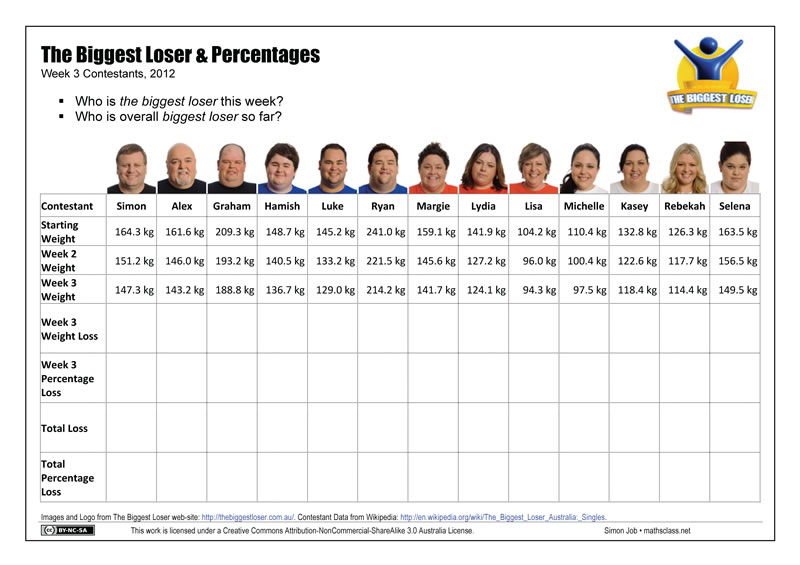
Each year I use the TV Show, The Biggest Loser, as an application of percentages – here is a worksheet for 2012 setting out the contestant data that your students can use to perform some calculations.
I’m completing this activity earlier than normal this year, so the data is from earlier in the competition.
Locker Problem
I recently used the “Locker Problem” in a Year 7 Maths Enrichment class (mixed ability). Here are some resources I used:
Quick Quiz - MathsStarters
I’ve updated the Quick Quiz app on MathsStarters.
Lesson Prep
Where do you go for maths lessons and good lesson ideas?
Here’s the start of my list, I’m not particularly recommending these sites, just listing them as places to look for ideas.
Understanding the Battle?
2011 (my 6th year of teaching) was a year of befuddlement1.
Lift Buttons
Whilst often used as a textbook example, I had never seen negative numbers used in a lift before.
MathsLinks Updates
I recently spent some time improving MathsLinks and adding some new features.
Superman Number Plane Logo
A number plane drawing worksheet for making the Superman logo. Included in the file (see below) is a page with a suitable coordinate grid.
Frequency Distribution Table
On MathsStarters, I have added a Frequency Distribution Table tool. The tool lets you have 3 to 10 scores, you tally as you go and the frequency and total are calculated.
You could use this on a projector/IWB (the buttons for incrementing the tally are sized for an IWB). Or, students could use this to record data on their own laptop as they collect it – paperless!
Smartie Statistics - Follow-up
Smartie colours are not evenly distributed across the two bags of 11 fun size boxes I used with my class:
Car Racing
Playing with the kids’ toys on the weekend, I came across this car and became interested by the relationship between pulling it back and how far it would travel.
Was it a linear relationship or something else?
Smartie Statistics
Looking around, there are lots of activities for collecting and analysing data using small boxes of Smarties. Here is my version.
Misleading Graph
I’m not trying to present a view, either way, on the carbon tax being debated in Australia. But those against the carbon tax seem to be providing some good fodder for the maths classroom.
Making a self-checking worksheet in Excel
I’ve had interest in how I make self-checking worksheets using Excel.
Index Notation/Laws Hot Potatoes Exercises
Last term I had Year 9 review and learn index notation and the index laws through some self-directed activities.
Pre-service Reflection
For 4 weeks this term, I handed over 3 of my classes (Year 7, 8 and 9 5.3) to a pre-service teacher from UWS. This is an important time for a pre-service teacher when in total they only spend 8 weeks in the classroom before ‘becoming a teacher’.
New Section - GeoGebra
I know there are stacks of GeoGebra files available on the Internet, but I’ve started putting my own here on the site.
Decimal Games
Some games, played with dice, for getting the hang of decimal place value.
Substitution Spider
Having made a Tables Spider this other day, I realised that I made myself a template for creating all sorts of “spiders”.
Maths for SRN
With Stu Hasic’s Student Response Network (SRN) virtual clicker software installed on the 2011 DER laptops that NSW public school students in Year 9 receive this year, I wanted to try it out.
Tables Spider
In 2007, I wrote about a resource, a Number Spider, that I used as a lesson starter.
The Biggest Loser 2011
Each year I use the TV Show, The Biggest Loser, as an application of percentages.
Online picture graphs
A worksheet to accompany the online tool Pictogram Graph (see on MathsLinks).
Mathematician’s Dice
Feeling nerdy? Backing this project on KickStarter will get you a Mathematician’s Dice for just $5 (2 for $10, 4 for $20).
Rather than the boring numbers 1 to 6, these dice have the six most important numbers in mathematics on them — i, 0, 1, φ, e and π!
To a new teacher…
A quote:
Learning math is like learning to play the piano. First menial arithmetic and endless scales, but then Chopin and one’s imagination. @mathematicsprof
Having done both (learn maths and learn the piano) I love this quote. I hated scales when learning the piano. It wasn’t till I had got through my many years of formal piano lessons that I understood how fundamental learning scales was to everything I can do on the piano. As teachers of maths, we face that same kid, trying to convince them that what they are learning now will bring them greater understanding later.
Double Strength Cordial and Ratio
When introducing the topic of ‘ratio’, I use the mixing of cordial as an illustration that most kids get.
The idea of using 1 part of cordial to 4 parts of water makes sense to them – and they get the idea of equivalence when you mix the cordial in a different sized container (I use the examples of using cups to fill a bottle for a picnic, and using buckets to mix a big batch for a party).
Coffee and Teaching Aids
I wrote about my t-shirt box back in 2009. It’s a resource I still use in my classroom. When teaching surface area I have peel off sides for the box which can be placed on the board to show the net.
4 years on
Four years ago today, the first post on this blog was published.
Fun with Coordinate Geometry
Tanya Duffy shared a great coordinate geometry activity on a private forum earlier in December.
What if the largest states of Australia had the biggest populations?
You might have seen this map featured around the place recently:
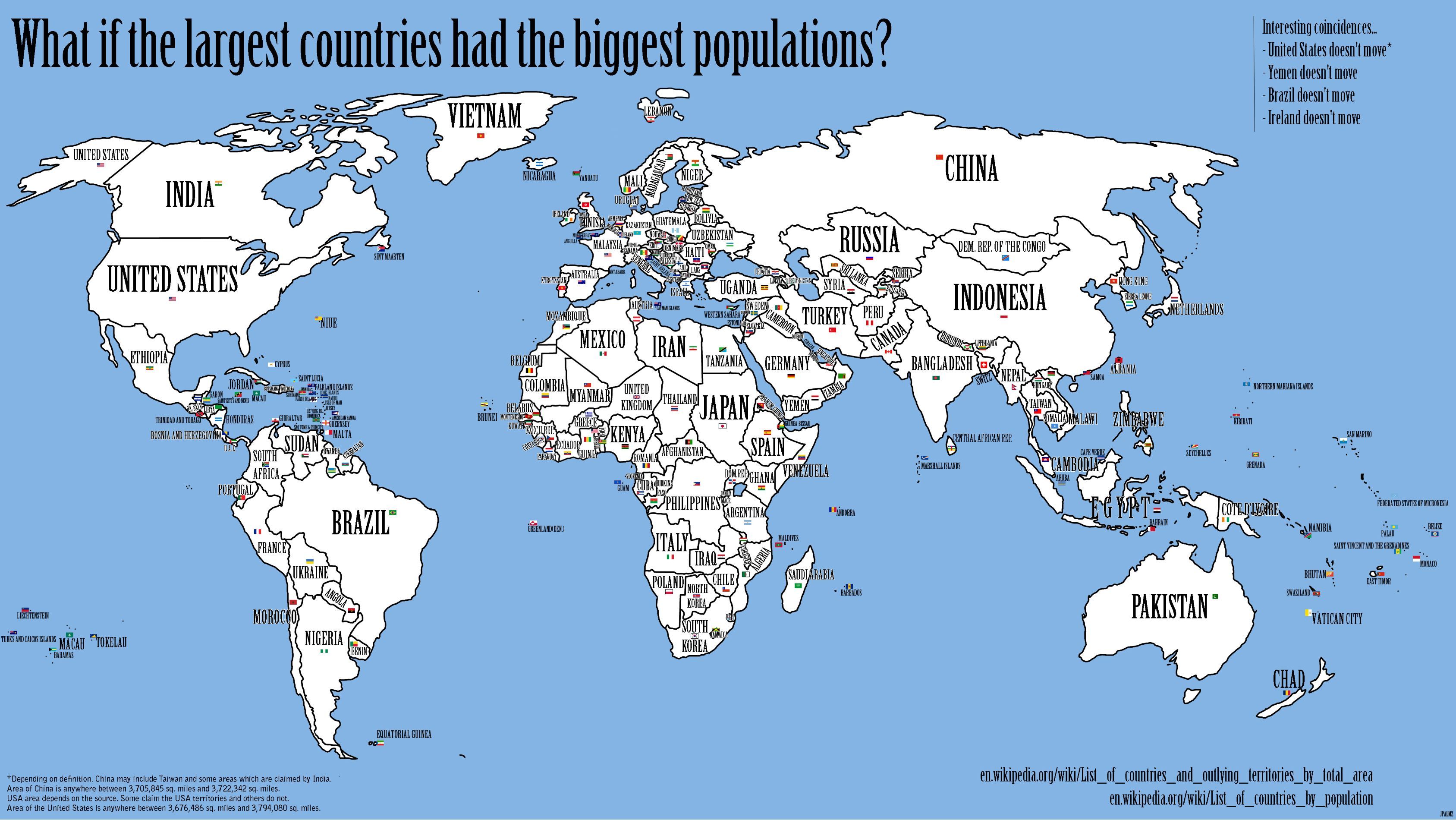
So I wondered, what if the largest countries had the biggest populations?
Teaching Surface Area
I like teaching surface area, I think it’s an interesting topic. Yet, I find kids struggle with the concept. Not understanding the basics of area and then getting over the prior knowledge of solids meaning volume are two aspects that cause some difficulty.
Inequalities with GeoGebra
This is a great interactive for representing simple inequalities on the number line: Inequalities with GeoGebra.
Back to it…
Returning from a few weeks leave, it wasn’t clear where my Year 8s were up to. I figured they had started looking at grouped data, but I didn’t want to repeat work they might have already seen.
Favourite on MathsLinks
I’ve added a nice little feature to the MathsLinks site – Favourites.
Follow-up to WCYDWT: Spacing Evenly
I showed WCYDWT: Spacing Evenly to some of my classes this week. A couple of reflections…
WCYDWT: Spacing Evenly
A real-life version of this problem presented itself today.

(Source: Elementary Math Mastery, Rhonda Farkota)
Letters and Numbers
Jeff of Webmaths points out a new Australian TV show, Letters and Numbers.
Lessons of stability
Things are tough at my school at the moment, tougher than normal. There are many reasons for that, this is not the post to discuss them though.
Prioritising
After 2 terms as a relieving Head Teacher, moving back to the normal classroom teacher load has been a bit of a shock. Even with faculty matters, I found myself achieving more of the extra things as a Head Teacher.
Building Bridges
For Australian teachers with access to objects from The Le@rning Federation, the resource Bridge Builder is a nice way to deal with geometric patterns and finding the algebraic rule.
Teaching Equations (or not)
It’s that time of year again… that’s right… Year 8 solving equations.
Term 3 2010 SDD
Each year for the Term 3 SDD (Staff Development Day), the four schools (three 7-10 and one 11-12) in the collegiate I work in get together for a combined program.
Are you water wise?
In recent years, Sydney Water has been encouraging households to save water. “With limited and highly variable rainfall in the catchments, the community can no longer rely on water from the dams.” source
MathsLinks Launch
After the recent redesign of MathsKit, the next site I have redesigned, or really launched is MathsLinks.
End of Term 7
The end of term series of posts are some of the most popular on this site.
MathsKit Redesign
For a while, I’ve been developing a new look for this site and working out how to better connect my maths sites.
Time - Self-checking Excel Resource
This is a resource for skills in working with time.
Investigating Scientific Notation
I’ve been trying to increase my use of the laptops with Year 9.
Significant Figures
In the NSW Mathematics Syllabus students are to learn about “rounding numbers to a specified number of significant figures” [NS5.2.1].
Pythagoras Outside
This is a fairly simple activity that allows for something different in the teaching of Pythagoras’ Theorem.
Dan Meyer: Math class needs a makeover
I think this is essential viewing for Mathematics teachers. I’ve been waiting for a meeting with my faculty to show them, which I got to do on Thursday.
Dan Meyer blogs at dy/dan, which you are already reading as a maths teacher… right?
Richer Percentages
How do you make a unit on percentages richer / project-based / engaging / authentic?
What do you call your maths staff? (poll)
Polite names of course!
A 2 question poll about the name used to refer to the mathematics staff at your school.
An idea for Maths Teachers
I suspect most readers of this blog would agree that online networking with other teachers is now the key form of professional development. Yet, we would all know many teachers who are not engaging online in discussions with colleagues.
Term 1 Recap
A different term to say the least. The lack of posts on this site illustrates how busy things were.
The Land of Algerb
Starting Algebra with Year 8, we spend a couple of lessons on various “algebraic techniques”. I’ve been trying to find some activities which provide a little more engagement. I created “The Land of Algerb“ to explain multiplying pronumerals.
Teaching Year 10 with Laptops
In 2009, Year 9 got their DER netbooks and now they are in Year 10. This year’s Year 9 does not have their netbooks yet, and so this gives teachers a little time to get their heads around the inclusion of netbooks into the classroom. This year, I’m teaching a 5.2 pathway Year 10 class (and a Year 9 5.2 class).
Laptop Wraps
For NSW DET teachers, I’m sure you know of TaLe, and hopefully have seen some of the resources for the DER that have been published there. One category of resources has been called Laptop Wraps (they are also available publicly).
My classroom
I really appreciate having my own classroom for many reasons, but one is the ability to place student work (the fun stuff) around the classroom.
Using the web
I just posted on my personal blog about how I use the web, looking at how the various technologies (RSS) and tools (Google Reader, Delicious, Twitter) fit together.
Make a roll book
Teacher’s all have their own way of keeping track of student attendance, and other aspects that are recorded in class. Here’s mine, it might give you some ideas.
Looking back on 2009
Usually I would reflect here on the year past. To be completely honest, I couldn’t be bothered reflecting on 2009. If I were to write down my thoughts, it would pretty much read like the post from February of 2009: Looking to 2009. It was a tiring and quite often frustrating year.
Getting your network in order
Reading blogs and networking on Twitter seem an obvious part of being a teacher. Yet when I take in to school a shiny new resource that I’ve received through one of these means, I usually get asked “where did you find this?”. The person behind the question is often thinking that I spend copious hours sitting at home in front of a computer “web surfing” or trying endless combinations of search terms in Google.
Chocolate Bar Graphs
Some chocolate discussion starters for looking at bar graphs: a series of chocolate bar graphs.

Guessing to learn
This week, my Year 8s have been looking at inequality signs, graphing inequalities and solving simple (one-step) inequalities. Today, after solving inequalities, we played a simple game. A simple, obvious game, that really doesn’t warrant a blog post.
2009 Edublog Awards Nominations
Here are my nominations for the 2009 Edublog Awards.
End of term activities 6
The end of term/year often brings lots of disruptions. So, as much as I like to keep teaching till the end, some days require something a little different. I like hands-on quasi-mathematical activities that allow every student to engage with and complete. And on Thursday, just before having one of those disrupted days, I found this…
Pie Graphs on Netbooks
Despite every Year 9 student having a laptop for a few weeks, the topics we’ve been covering haven’t lent themselves to full laptop lessons. To end the term, though, we’re reviewing graphs.
Drawing in Excel
A lesson for Year 9 students with DER laptops, or anyone really.
Some graphs are just wrong
Here’s a great example of a graph that is just wrong, the data may be correct, but it has obviously been represented the wrong way. Watch the video…
Evidence of doing anything
I think that each student using a netbook/laptop in your class presents some slightly different issues in Maths.
Heat Sinks - Surface Area
I’m about to get into Surface Area with Year 8. Of course, there will be chocolate. But, since I last looked at Surface Area with Year 9 I’ve been thinking about Heat Sinks.
Updates/feed change
I have turned off the automatic inclusion of my Delicious “maths” links in the update feed/email for this site.
Introducing Probability
This is an amusing video to introduce probability… some of my Year 8s found it hilarious.
Making a matching activity
As I mentioned, the DER roll-out hit my classroom as we were in the midst of Algebra. Due to a tight program and exams shortly, I had to stick with a couple of topics which don’t really allow for “play” on the laptops as much as I would have liked.
A lot of the Algebra taught at the Stage 4 level is technique, and so matching activities work particularly well to practise and review skills.
Here’s a review of some of the ways I’ve found to make matching activities for use on the laptops.
Resize to Netbook Size
Not really maths related, but handy if you’re looking at a web-site that will be used on a Netbook.
Report writing season
Report writing season… ponder kid, ponder kid, write a paragraph of positive when you’d rather be honest, edit, colleague cooperatively corrects copied carelessness, supervisor strikethroughs signify subtle substitutions, remove commas, add c,o,m,m,a,s, throw in a hyp-hen for good measure, correct, copy to system, shorten, review, save, have a life… wait for reports to be published… find report in bin.
Handling the Inappropriate
Week 1 is over, and I need to reflect on what happen when I introduced laptops into my classroom.
Computer Aided Homework
A Digital Education Revolution (DER) laptop in the hands of all Year 9 students changes everything… or does it?
MathsKit
I recently created a site called MathsKit. Whilst I added some links to it on this site, I haven’t actually mentioned it yet.
DERing with Year 9

Year 9 got their DER netbooks just before the end of Term 3. The first week of Term 4 will be the first time they have them in class, so I wanted to start term with some introductory activities, with a Maths focus.
This post is a work in progress, check back for updates.
20 Oct 2009: Go to update
Words for operations
I’ve been meaning to try ClassTools.net for a while. With ClassTools.net you can make interactive Flash games, from a range of templates, then save and share them.
End of term activities 5 - Patterns
Tomorrow is the last day of term… hurray! Here’s another end of term activity for use with your maths class.
Link: Western Bulldogs Number Plane Logo
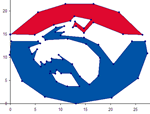
If you’re looking for more number plane drawings, but lean towards AFL, then check out Jeff Trevaskis’ Western Bulldogs Number Plane Logo from his blog, Webmaths. Nice one Jeff!
Making a dice
In my IST class, we’re studying Modeling and Simulation, and started to make a model of a dice using Excel.
Thinking about it, the technique involved in making this would also be of interest to Maths teachers.
NSWDER Tutorials
Brad Bennett, a student at a NSW DET Public High School, has made a site called DERNSW Tutorials – Tutorials for students and teachers using NSWDER laptops.
Brisbane Broncos Number Plane Logo
Last year, I posted the Melbourne Storm Number Plane Logo – and today, exactly one year later, purely by coincidence, I’ve made a Brisbane Broncos Number Place activity.
Teaching equations
Year 8 were recently assessed on solving equations and I was a little perplexed by the results.
League Tables
There has been a debate in Australia about the creation of league tables comparing schools. I think the government(s) intention is to just make more data publicly available and easily accessible. No matter what the data says, or the impact of producing the data, the one thing the government(s) have not explained, let alone committed to, is what they will do if the data shows an under performing school (whatever that means).
Classroom Icons
Having found this tip on elearnr.org Doug Belshaw’s blog about using PowerPoint:
Find graphics that represent things you do frequently in lessons (perhaps from clipart) and always use these when doing a similar activity. For example, a pen writing for when it’s time to start work or two people talking for discussion/group work. These help reinforce good habits and aid classroom management.
I went looking for some nice graphics to use.
Perimeter of curved shapes
This week, Year 9 were looking at finding the perimeter of shapes that include curves (parts of a circle).
World’s Fastest Clapper
Here’s a quirky little activity that uses the DER laptops.
Student Expectations with Laptops
As a PBL school, we have lots of “Student Expectations” at our school for nearly all aspects of an ordinary day (entering the classroom, in the playground, walking through a corridor – we have narrow corridors, formal assembly). In a couple of weeks, there will be another aspect of the “ordinary day” – laptops. So, I’ve drafted some student expectations for the technology committee at my school to discuss.
Asking Yr 9 about laptops
As part of the last lesson with my Year 9 class in Term 2, I asked them to write me an email expressing their thoughts about getting their own laptop in Term 3.
Using GeoGebra
This article is not a “how-to” but rather some thinking about using GeoGebra (a discussion starter maybe).
Curriculum Support for DER
For NSW DET teachers, the Curriculum Support web-site has been updated with resources for the DER, i.e. the laptops being rolled out to Year 9 students.
10 Things Teachers Should Know Before 1:1
A quick read… some thoughts on 1:1 Computing from the “Free Technology for Teachers” blog: 10 Things Teachers Should Know Before 1:1.
Updated: Another new article: Ready for 1:1? Check this list before you answer from Darcy Moore a DP at Dapto H.S.
Time to learn
Teacher’s throughout NSW DET schools are starting to receive their DER netbooks.
Google SketchUp
Google Sketchup is one of the applications bundled on the DER netbooks being rolled out into NSW Public High Schools in Term 3. But as it’s free, you can download it now for Windows XP/Vista & Mac OS X.
Teach the teachers
From The Australian, Technology lesson one: teach the teachers comes this:
... “This isn’t just about teaching teachers to use the technology,” Professor Stoney said.
“It’s about teaching them to use it for learning. How do students learn with technology?
Laptop rollout
I recently contributed some comments to the executive at my school about the DET roll-out expected to be happening soon. A slightly editted version is below. I’m really not sure where the executive are at with this roll-out, I haven’t heard much except from the computer coordinator – it’s a shame, or more accurately, it makes me nervous, because there is the potential for a lot of problems to arise from this roll-out if we’re not prepared. I’m republishing my comments because they might help you in engaging with your school about planning and preparation.
Dam Water
Still on capacity. With Australia having been in a drought since 2003 another interesting way to engage with the topic of capacity is to look at the water storage levels.
IWB in High School Maths - What I’ve done
My previous post on having an IWB in my classroom was written about three weeks after it’s installation. Tomorrow, we’ve got an IWB consultant/trainer/type-person-thingy coming to school, and I was asked to share what I’ve been doing with the IWB. So I wrote a quick list.
A response to the DER
The DER, as it is unfortunately named, is about to hit NSW schools.
What’s in the fridge?
What else could you do with capacity? As I was getting a glass of juice to have with my breakfast, I was thinking that I could use this image as a quick question at the start of a lesson.
Digital Media - Capacity
With laptops rolling out shortly and projectors appearing in some classrooms, we should be thinking about collecting digital media for use as stimulus or investigation material. So, the other day when filling up my young daughter’s bottles, I took some pictures.
Maths Links
For a while I’ve been collecting and saving to a web-site maths objects to use with my classes. By objects I mean single activities, rather than a web-site of maths activities. I’ve been trying to take some of the many things I find and save to delicious and put a purpose to them – deciding that it’s something I could use with one of my classes.
Dice
I wanted to play a multiplication bingo type game with a class the other day, so I grabbed two 10 sided dice (apparently you don’t need to call a single dice a “die” anymore) out of the cupboard. Then I thought… hey I have a projector and a laptop.
Maths L4L Wiki
If you missed it in the comments to an earlier post. There are two new wikis you might want to keep an eye on as a NSW DET teacher (or any Maths teacher really).
L4L Software Specs
The NSW DET will shortly equip Year 9 students with a Lenovo S10e netbook as part of a program called “Laptops for Learning” (L4L). To me, if we are going to do this – then it’s time to include some good software on these machines and help out schools who cannot afford some of the more exciting applications.
Universcale
Depending on what they’ve previously experienced, students struggle with the immense scale of the universe (mind you, so do I).
Isometric Drawing
When starting “Volume” with Year 8, we start by looking at cubic units and isometric drawings. This year, with an interactive whiteboard (although, these resources are also suited for use with just a projector or in a computer lab), I was able to use a couple of excellent online resources.
Drawing Mathematically
Are you drawing mathematical diagrams in Microsoft Word? You might even be achieving success doing this; once you’ve worked out how to wrangle Microsoft apps to do what you want, they can be powerful. But, for drawing mathematical diagrams there are better options.
FX Draw by Efofex is the application for drawing static diagrams for inclusion in worksheets, assessment tasks etc. The one down-side of this software is that there is no Mac version. (The rest of the Efofex MathPack is worth the money as well)
The Perfect Tree
I was preparing for part of a presentation to the staff at my school tomorrow, highlighting the importance of numeracy being included in all subject areas.
Preparing for Laptops 4 Learning
Term 3 will see the roll-out of netbooks to Year 9 at my school (some photos of the Lenovo S10e).
I’ve been thinking about how to prepare for this roll-out in my own teaching.
Transformations
 Here’s a PowerPoint file I made to quickly review transformations before getting into congruency.
Confusing with words
I wonder how often maths teachers make confusing statements like this in class:
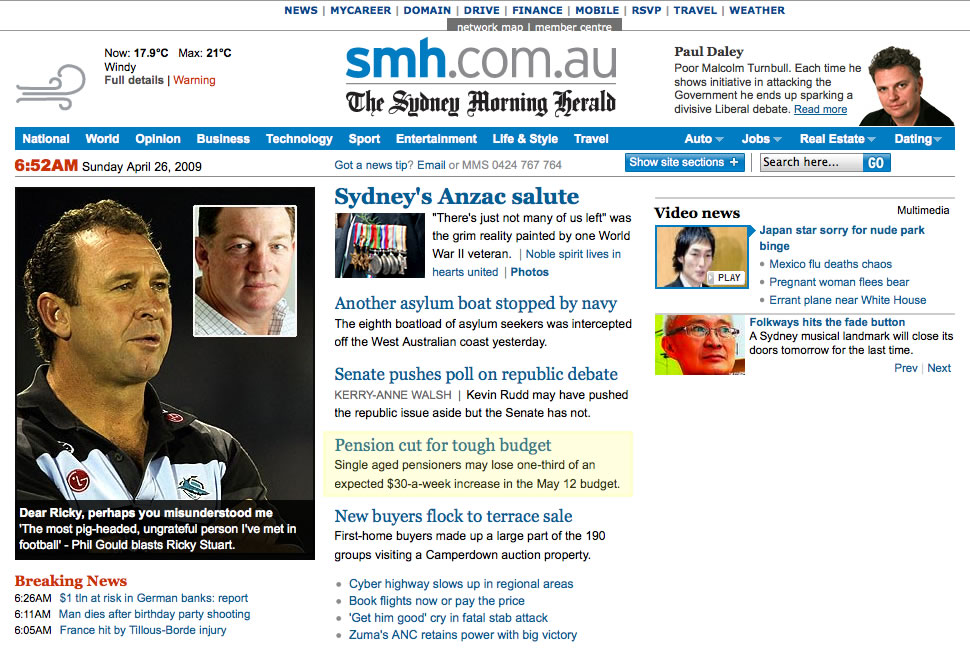
Single aged pensioners may lose one-third of an expected $30-a-week increase in the May 12 budget. [emphasis mine, front page of smh.com.au on 26th April 2009]
What they actually mean is that the expected increase will be $20.
Chocolate and Maths

Eating chocolate could improve the brain’s ability to do maths.
[full story: telegraph.co.uk
AKA, justifying the use of Freddos in the maths classroom.
Parts of a Circle
I need to learn to use GeoGebra because it looks like a fantastic app, it’s free and shortly our students will have their own netbooks, itching to use them. I find the best way to learn new software is to do something with it that you need.
Interactive Whiteboard in High School Maths
This may be the first of several posts as I review the effectiveness of having an Interactive Whiteboard in my classroom.
The Biggest Loser 2009
The Biggest Loser, the Australian version, is again on television. This year, Year 9 are looking at Percentages at the same time.
End of term activities 4 - The Game of Hex
The last week of term begins next week…
A digital education revolution?
I have watched with interest the Digital Education Revolution proposed by the Australia Government. Issues of cost seem to have been resolved and I’ve resigned myself to the fact that the NSW DET is pushing a one laptop fits all model (although I think it’s flawed). I’ve read the tender for the “DET Learning Device” and have even dissected it with my computing class. But today, 1st April – fitting really – a significant step to realisation has been taken with the announcement of the hardware and software to be supplied.
What’s wrong with this protractor?
It’s been a little quiet around here – mainly due to the busy time of term and sickness.
Anyway, I recently got a packet of protractors for my class. Every one of them has a problem, maybe you can spot it.
Million, billion, trillion
I used to think that I knew what 1 billion was, i.e. 1 000 000 000 000. Then a couple of years ago, I looked on Wikipedia and found there were two defintions: Long and short scales.

Bearing and airports
As part of a unit on Trigonometry, we review compass and true bearings before working with bearings in Trigonometry problems.
To start this review lesson, we looked at some images from Google Earth.
A story for Trigonometry
A really easy way to create engagement when introducing a new topic is to explain some of it’s applications outside of the maths classroom. For Trigonometry, I use an explanation of how I used trigonometry in a previous career to find the height of trees.
The Big Picture
If you don’t have The Big Picture from boston.com in your RSS feeds, it’s time to add it. Alan Taylor regularly collects some fascinating photos together. This edition, At work.
Maths with Adam Spencer
Having even a basic but strong numeracy to you is something that really can give you a lot of advantage in life.
 The NSW DET have published their first e-zine for Parents which includes an interview with Adam Spencer (Breakfast radio presenter on ABC 702 and Mathematician) by James O’Loughlin. It’s a helpful discussion about Mathematics at school and how parents might help their kids.
Siftables, the toy blocks that think
This blog is about Maths teaching, however this year (as noted in an earlier post), I’m also teaching a computing subject: Information and Software Technology. Occassionally, I’ll post something that is more related to a computing subject than Maths, but hopefully everyone reading this blog will still find it interesting.
Sector Graphs
In my fourth year of teaching, I’m finally happy with how teaching sector graphs went.
Free of technical hassles
In a previous post I talked about the Digital Education Revolution – the roll-out of student laptops. There will probably be quite a few posts on that topic this year.
T-shirt box
Keep an eye out when shopping, a great maths teaching aid could be staring you in the face.
Hot
It’s a new school year. This post, therefore, should be full of optimism and goals. But, please indulge me in a short whine.
It’s hot, ridiculously hot.
Looking to 2009
2009 will be my fourth year of teaching. There are a few things happening this year that I want to note now, so I can reflect on their outcomes at the end of the year.
You Can Do Maths
The Australian Association of Mathematics Teachers (AAMT) recently created a web-site called “You Can Do Maths”. From the site:
The youcandomaths campaign encourages all young people and their families to appreciate the important role mathematics plays in many careers and everyday life.
See, maths is important
An embarrassing, and slightly funny, example of why Mathematics is important (in this case, being able to read a calendar).
Annual Report 2008
This post is my entry to Dan Meyer’s contest My Annual Report II.
No projector for you
Going into school today, I was looking forward to seeing a new digital projector and Interactive Whiteboard installed in my classroom.
Getting started
There are a couple of previously published resources on this site that might help you out as you prepare for the new school year.
Borrowing Money in Plain English
Another good video from The Common Craft Show. This one is on Borrowing Money.
Theatrical Aspect Ratio
Recently Dan Meyer posted his thoughts on the ideal maths textbook, which would actually be a digital archive of very interesting mathematical media
. This is a great idea, and whilst I don’t have a projector in my classroom yet (although fingers-crossed), it would be something that I would buy/subscribe to. Anyway, there was a challenge in this for me: being mindful of the media I consume and the world around me to collect digital bits and pieces that might help explain a mathematical concept (I commented on Dan’s blog that I missed the opportunity to take a picture of 3m³ of dirt I had delivered). The second, to my mind harder, challenge is to take that item and make a meaningful and engaging connection with a concept being taught in class.
Temperature Conversion Graph
As I was putting together a lesson on using conversion graphs, I couldn’t find a nice temperature conversion graph – so I created one.
Saving Money in Plain English
This video from The Common Craft Show is an excellent “introduction to the magic of compound interest and how it helps money grow over time”. Keep an eye out for more videos in their financial basics series.
2008 Review
In my post Thinking about 2008 I noted four things to improve my teaching in 2008, here I review how I did.
Maths symbols in Word (Mac)
Some of the methods in this article do not work in Microsot Word for Mac 2011. Please see the updated post Mathematical Symbols in Word for Mac for a screencast describing the current best method (in my opinion).
Creating a maths worksheet in Microsoft Word without using the proper symbols does not present well – I’m sure you’ve seen 2 * 2 = 4 or 2 × 2 = 4 rather than 2 × 2 = 4. My previous post, Maths symbols in Word is one of the most popular on this site. In that post, I gave shortcuts for inserting mathematical symbols into Word – the post was specific to the Windows version of Word. As I’ve been a Mac user for a year, it’s time to make a similar post for Mac users.
Wild About Math!
I’m currently sorting through the many teaching blogs I subscribe to, trying to cull the list. The thing about Maths related blogs that tends to keep them in the list is that Maths teachers generally write more practical posts.
The Story of 1
Here’s a video about the history of number, in particular the numbers 0 and 1. Our Year 7 program begins the year looking at ancient number systems, so this video will fit in nicely.
MathsClass Site Maintenance
Today I finished moving MathsClass. You’ll hopefully notice no difference, but it changes some things for me and allows me to expand this site a little in the next couple of weeks. As a result, if you subscribe to this site via the feed or by email, you may have seen old entries reposted as new – sorry about that. They’re obviously not new, but in the moving process were “updated”, hence they’ve reappeared in the feed and email updates.
Merry Christmas, and if you’re looking for something to do this break, check out the properties of your favourite numbers on the Number Dictionary (unfortunate URL, but a good site).
MathsClass Survey
MathClass has sort of become a blog of resources, rather than a more general conversation about teaching. I’m not sure whether that’s necessarily a bad thing, so I’d like to know what my readers think.
Equal areas in a circle
Trying to motivate Year 10 after the School Certificate Exams are completed is tough. I like to use geometric design activities. Whilst they seem like “fun”, or at least non-taxing on the brain – they get the students following a procedure, using geometric instruments and can be lead to a good discussion about the Mathematics of design.
Melbourne Storm Number Plane Logo
Around this time each year, our programs have Year 8 and Year 10 looking at the Number Plane. For the end of the term, it’s nice timing, because it allows us to draw some pictures on the number plane. One favourite is the logos of various
teams.
Fraction Shading
Understanding the concept of a fraction by shading in a part of a shape is a fairly standard introductory activity. When I did a search on Flickr for fractions, I found this set of fraction shading diagrams*. What I liked about these diagrams is that you are required to represent two fractions on one diagram.
Perpendicular lines activity
This simple design activity could be used as something extra whilst Year 7 are using geometric instruments and learning about perpendicular lines. Or, as a stand-alone activity.
Angle Wheel
Building an Angle Wheel is a great way to consolidate an introduction to angles for Year 7.
Searching Pi
The Search π website does just that, allows you to search the first 3.2 billiion digits of pi for a string of numbers.
Estimating length
When looking at measurement, year 7 measure “body units” and use them to measure things in the classroom, as an example of estimating. Then, when we move onto perimeter, we come back to one body unit, the pace.
Profit, a story
Starting a lesson on profit and loss with this story, quickly introduces some key concepts and we have a bit of fun.
Big Number Line
For many students, working with directed numbers (positive & negative numbers) requires the visual aid of using a number line.
The Biggest Loser
‘The Biggest Loser’, the Australian version, is currently on Channel 10. Conveniently, it appears on TV the same time we’re looking at Percentages with Year 8 providing a great connection between popular culture and maths.
Frustrations
There’s a lot said in university lectures, teacher inservices and blogs about how we should be teaching.
Two fonts - tally and calculator
Two very handy fonts that will help make worksheets and other computer created resources look great.
Keeping organised
I’ve found that teaching is one of those jobs where you end up making “to-do” lists. Years ago, I was determined to do away with paper-based to-do lists chasing me around. I started using Backpack described as an “information organiser” — Gather your ideas, to-dos, notes, photos & files online.
Google Forms
Google have added a nice little feature to their online spreadsheet – the ability to collect information via an online form.
They’re quicker than me
Each year, we review the four basic operations with Year 7. We don’t re-teach, because they would have already developed a method in primary school. So, for each operation, we mind map different methods for solving a couple of different problems.
Tell me about maths…
In the first lesson with each of my classes, I gave them a chance to let me know how they felt about maths. I hope this conveyed to my students that I am interested in what they like about maths and what they find difficult, it also gives me a basis for creating activities and future reflection to see what we’ve achieved.
End of term activities 2
It’s been two terms since my last post on this blog, End of term activities. So, as I return to this blog at the end of the year, here are some more “last day” type activities.

End of term activities
For the last day of term, lessons may not follow a normal program, however they can still be engaging and mathematics related.
Lesson Starters
Lesson Starters is a page full of activities to start a mathematics lesson.
One I’ve used is Number Spiders, there’s even an overhead (PDF) ready to print. Keep it in your classroom for those days when you know the start of the lesson is going to be disrupted.
Number Bowling
Another game, this time for the most basic “technology” in the maths classroom – the calculator.
Quiet vs quiet
I had a chance the other day, rare, to reflect on what was happening in my classroom during class time. I noted one of the inconsistencies in my language.
Pig
I’m trying to build up a collection of maths games for lesson fillers, reward and skills practise.
Heart Rate Activity
An outdoors activity is always a welcome change to a maths lesson. To introduce rates, I take the class outdoors to measure their heart rate.
EAA Mathematics Resources
Here’s a nice page of resources for Mathematics teachers, published via the EAA (Educational Assessment Australia, UNSW).
Generating random questions in Excel - Basic operations
In this second post about using Excel to generate random questions, the first showed how to make a question about money, I show the simple formulae used to generate questions using the 4 basic operations.
Prepared
University teacher training can only teach you so much, there are many aspects of being a teacher that university does not prepare you for.
Checking books
At my school, one of our key values is “organisation”. Organisation covers many things in our school, like lining up, walking on the left, and bringing the necessary equipment each day. In the classroom, organisation is encouraged through regular book checks.
Generating random questions in Excel - Money
Excel, part of Microsoft Office, is great for working with numbers. For a maths class, Excel can be used for standard applications like working with tables of data and creating graphs. Other teaching and learning applications that I’ve seen include creating self-marking computer based worksheets, interactive worksheets using sliders and even randomly generating questions for paper worksheets.
Lined paper
The new school year in Australia starts in just over a day. Here’s a “new school year helpful printable download”.
MathsClass Search Engine
There are two search boxes in the right-hand column of this site. The first just searches this site. The second is much more interesting.
Tech in the classroom, a struggle
One of the difficulties I found in my first year, was using technology in the classroom for the teaching and learning of mathematics.
Report: “Their Space: Education for a digital generation”
In the 16th January 2007 episode of the BBC’s program Digital Planet, Gareth Mitchell talks to the authors of a report about children and technology. The report is titled “Their Space: Education for a digital generation”. It’s a free PDF download. I haven’t read it yet… maybe some reflections in a future post.
Maths symbols in Word
Many teachers use Microsoft Word to create worksheets. It’s not designed for the job, there are better options but Word is the easiest to learn and has the greatest compatibility – making it easy to share documents. One of the problems I see is that many people don’t know how to insert symbols into their document. For example, x (the letter) is not a good substitue for × (the multiplication symbol). This post shows you how to insert symbols like ×, ÷ and π quickly, on most computers (a Windows PC running Microsoft office).
New Subscribe to the …
MathsLinksemail newsletter
Get updates…
About
Simon Job — eleventh year of teaching maths in a public high school in Western Sydney, Australia.
MathsClass is about teaching and learning in a maths classroom. more→
Archive
Elsewhere
 @simonjob
updates via @mathslinks
Recently read/found.
Piano Keys
maths musicThe Size of the Piano Keyboard
maths musicCalculating Fret Positions
music maths